
1. Overview
This document outlines the implementation of a custom Power Apps Component Framework (PCF) control for seamless file upload and document management in Microsoft Dynamics 365 using Azure Blob Storage.
File Upload Module
Modern, user-friendly upload interface supporting metadata like description, document type, and uploader for efficient document handling.
Sub Grid Module
- Displays uploaded documents from Azure Blob Storage within Dynamics 365 UI.
- Supports pagination and sorting for better navigation.
- Customizable visual design for enhanced UX.
2. Core Problem Statement
Standard Dynamics 365 does not provide a seamless, scalable solution for:
- Uploading files with rich metadata.
- Storing files cost-effectively using external storage like Azure Blob.
- Displaying/managing uploaded files dynamically within the form UI.
3. Challenges Addressed
Inefficient File Upload Experience
- Problem: Native file upload lacks size support, metadata, and design.
- Solution: PCF control with modern UI and metadata fields.
Limited Storage Scalability
- Problem: Dynamics Dataverse storage is costly and not scalable.
- Solution: Files stored in Azure Blob Storage with folder organization.
Lack of Integrated File Management UI
- Problem: Users can’t manage files easily within Dynamics forms.
- Solution: Custom subgrid with:
- Pagination
- Sorting, filtering
- File type badges
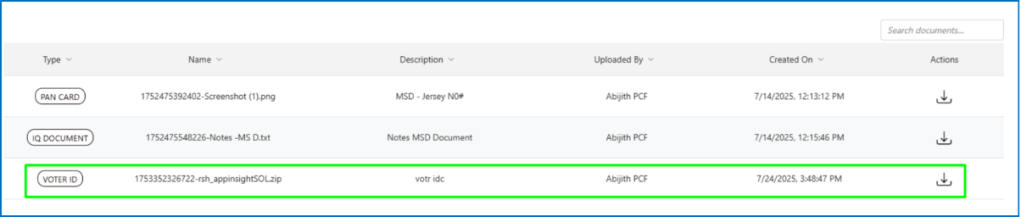
- Preview/download
- Responsive layout
Manual Folder & Metadata Management
- Problem: Organizing files by contact or entity requires custom development.
- Solution: Automatically creates folders and stores metadata.
4. Target Audience
- End Users: Intuitive file upload and document viewing experience.
- Admins/Devs: Easy-to-integrate and configurable solution.
- Organizations: Save storage costs and improve governance.
5. Key Features
File Upload
- Large File Support: Real-time progress bar.
- Rich Metadata: Captures document details.
- Drag-and-Drop: Smooth upload UX.
- Validation: Inline error handling.
Subgrid
- Pagination: Configurable size (e.g., 10/20 rows).
- Styling: Hover effects, resizable columns, striping.
- Interactivity: Preview/download, badges.
- Responsiveness: Supports all device sizes.
6. Integration with Dynamics 365
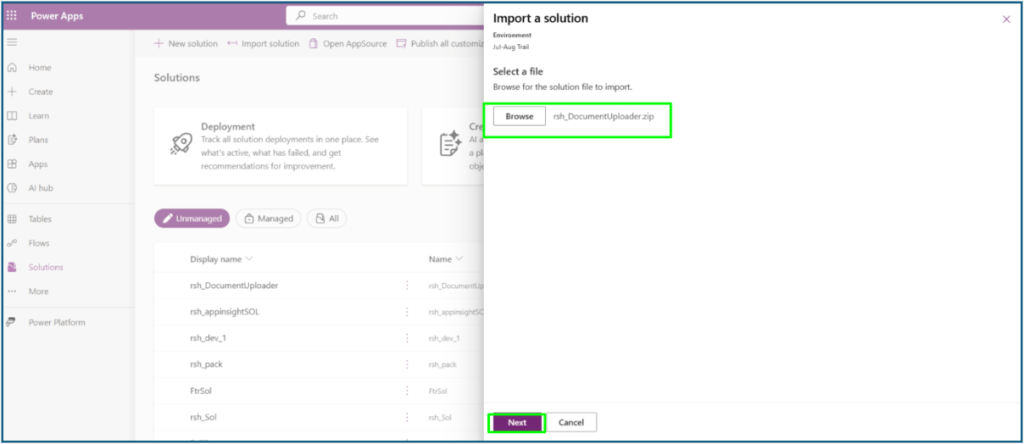
Step 1: Import the PCF control into Solutions.
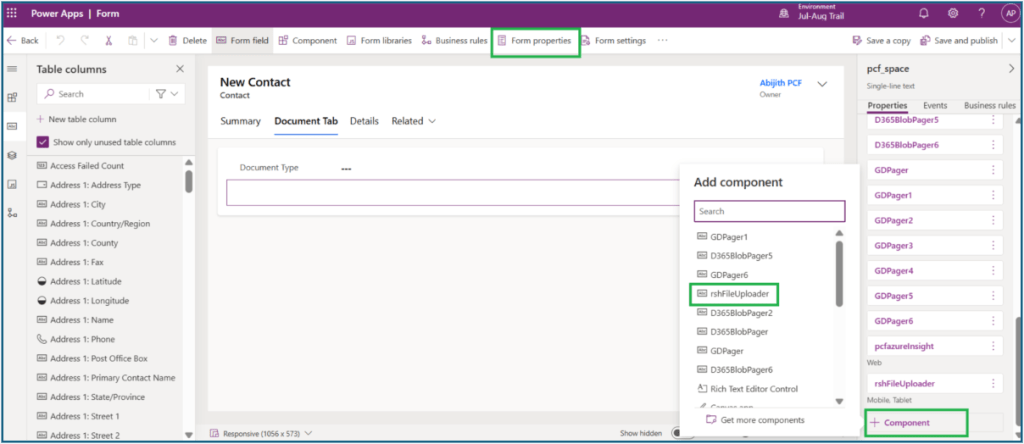
Step 2: Open form editor for the relevant table (e.g., Contact).

Step 3: Add the rsh_FileUploader to the desired form section.
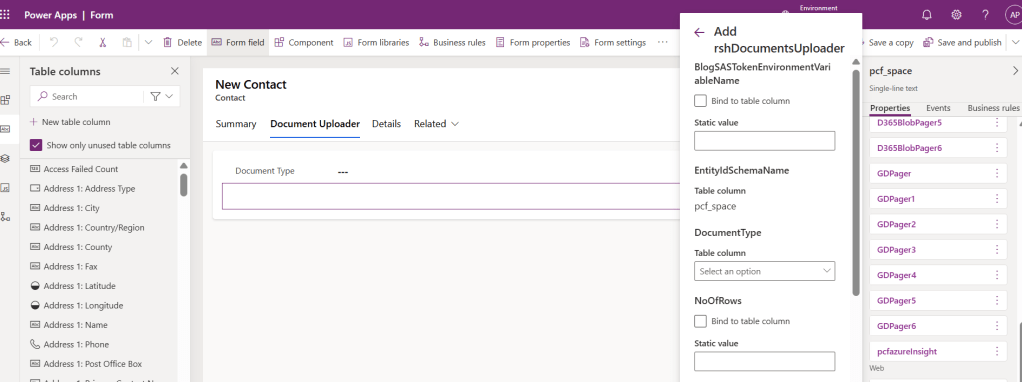
Step 4: Bind parameters
- EntityIdSchemaName
Description: Unique identifier of the entity record used to create a folder in Blob storage. - DocumentType
Description: Specifies the type of documents to be listed. - NoOfRows
Description: Number of records to display in the sub-grid. - BlobSASTokenEnvironmentVariableName
Description: Holds the environment variable name that contains the Blob SAS token details.
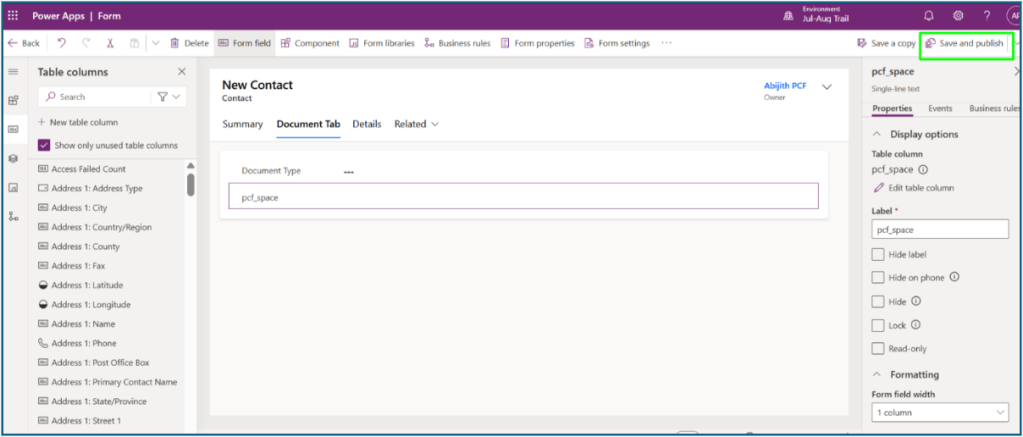
Step 5: Save and publish the form changes.
7. Using the Control
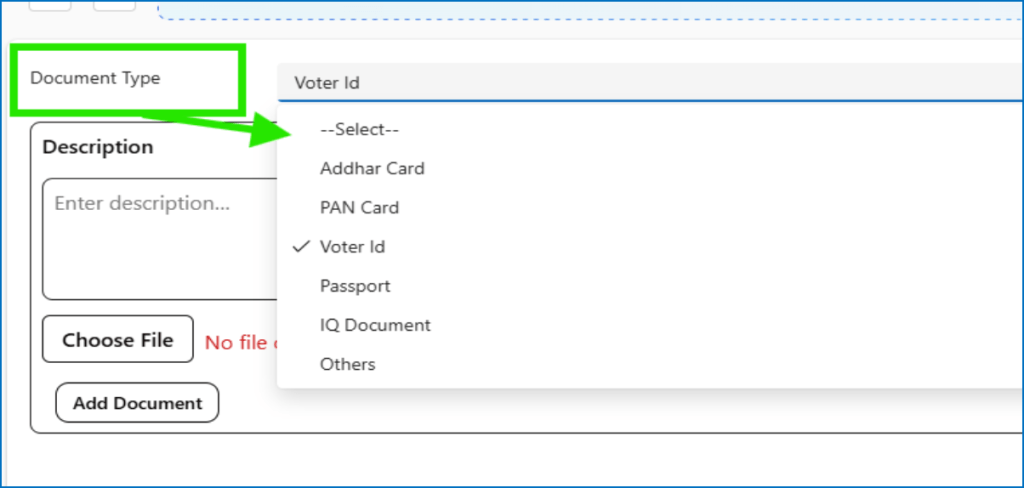
- Select Document Type and provide Description
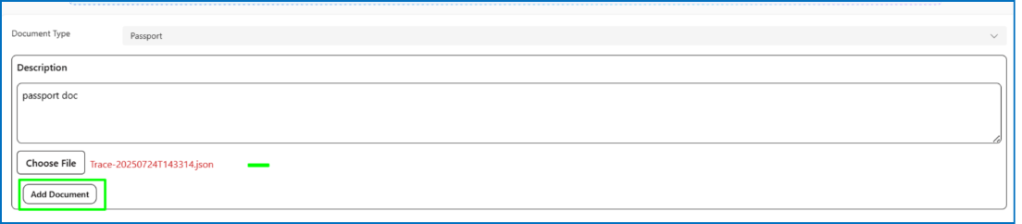
- Choose and upload a file
- Click “Add Document”
- Confirm in popup, see the file in subgrid

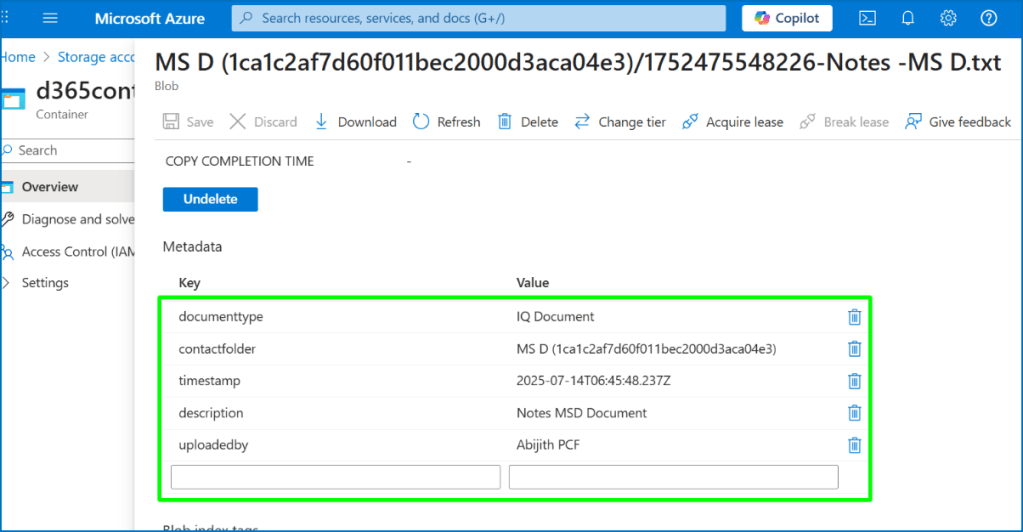
8. Blob Storage Structure
Existing Contact: File saved to d365-documents/Contact/GUID/Filename.pdf
New Contact: Folder auto-created, then file stored.
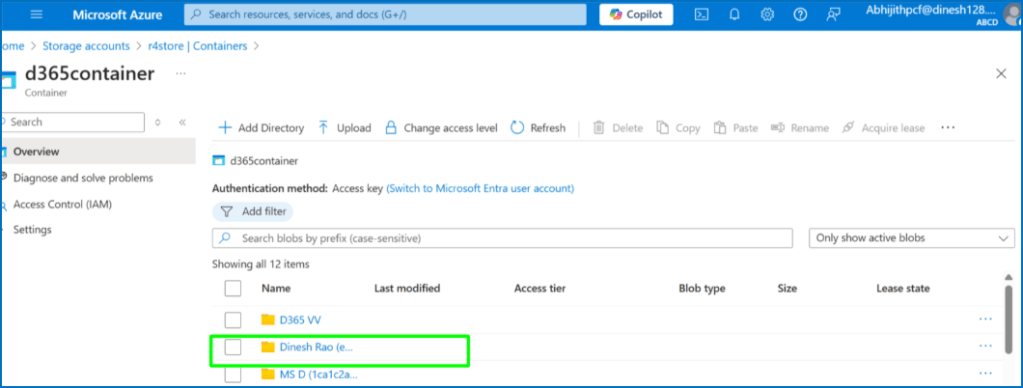
Metadata: Captured (e.g., description: "Q1 Invoice", uploader: "John Doe")
9. Assumptions
- Azure Blob container is pre-configured.
- Dynamics environment has import permissions.
- PCF packaged using Power Platform CLI.
- Preferably in a single-column layout for optimal display.
10. Considerations
- Metadata keys must follow schema consistency.
- Ensure mobile/tablet compatibility.
- Audit trail via Azure AD user tokens.
- Use CSS Grid for responsiveness.
11. Constraints
- Azure Blob availability required for file uploads.
- File size limit depends on browser/D365 limits.
- Preview support depends on browser.
- Extra logic needed for post-upload metadata retrieval.
12. Summary
This custom PCF solution modernizes Dynamics 365 file management with:
- File Upload: Metadata-rich uploads to Azure Blob.
- SubGrid: Interactive document list with preview/download.
Boosts usability, scalability, and reduces Dataverse storage dependency.
 RSHANU
Leave a comment